
Nlview Widgets
Automatic Schematic Generation
Concept Engineering's Nlview® engine provides automatic generation of schematic diagrams for different levels of electronic circuits, including gate-level, RTL and block-level. Optional engines are available for the system-level (S-engine), for the transistor-level (T-engine), and for automotive and aerospace applications (E-engine). The schematic layout can be modified and controlled by human intervention and always optimized by algorithms. A fine granularity of user preferences can be mixed with machine computed "beauty" to get the best human readable diagrams. Interactive circuit exploration is supported by incremental schematic generation technology. Nlview provides a set of APIs and interfaces with a certain GUI environment.
On this page, please find below: Examples, Widget Family, and Good Reasons
Example Schematic Diagrams
The examples below show Nlview-generated schematic diagrams with comments; click on the cropped pictures to display the full view.
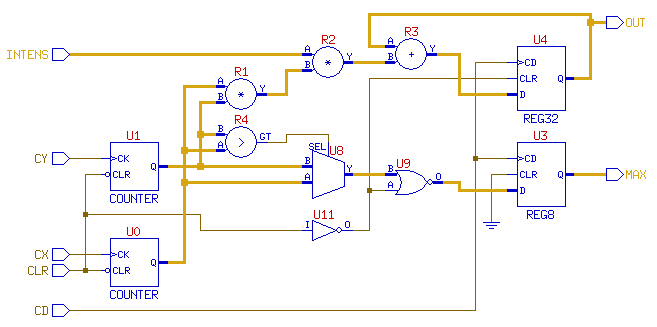
This simple schematic diagram shows a circuit on operator level with bused connectivity. The connectivity may come e.g. from elaborated Verilog. One way for doing that is using the third-party Verific parser and the VVDI-link that gives Nlview access to the Verific netlist database. The VVDI-link is part of Concept Engineering's Nlview software package.
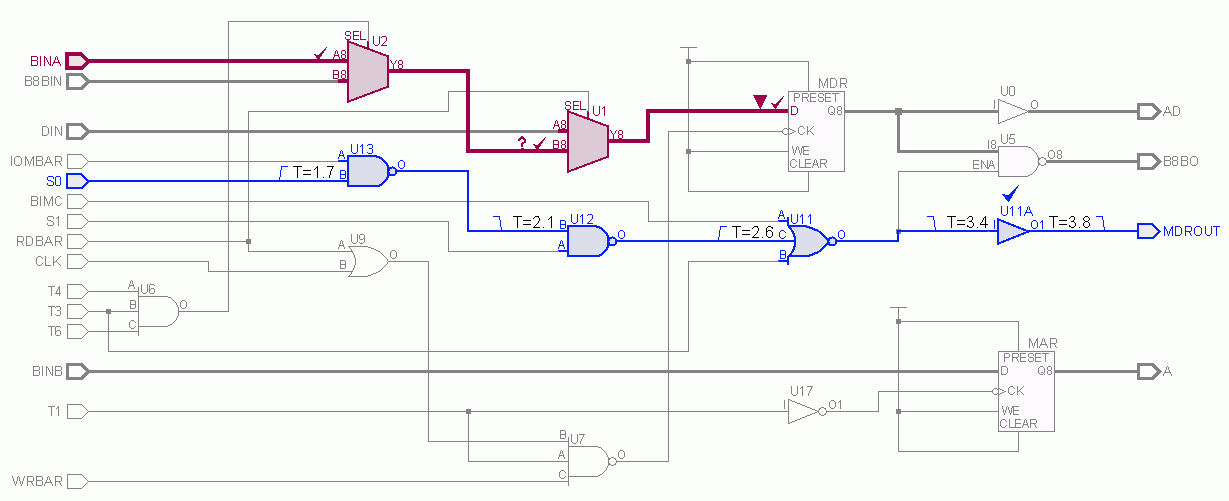
This schematic diagram shows two highlighted paths and some timing values – as text labels – and some markers (that may have been computed by a third-party tool, e.g. a static timing analyzer). Text labels, markers and highlighting can quickly change without adjusting the schematic layout. However, Nlview can optionally adjust the schematic layout to avoid text overlapping or reuse free space whenever the text labels change in length. For this simple example the loading of the netlist and the generation of the schematic diagram takes about 8ms of CPU time on an old Intel Xeon and the Nlview data-base consumes about 100kB.
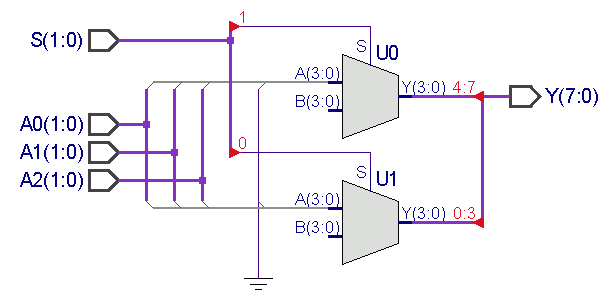
This schematic diagram shows two bused muxes with some non-trivial bus connectivity. The rippers are automatically created. The circuit (netlist) given for this example is defined on single-bit level with Nlview performing automatic net bundling from the connectivity (however, the IO port buses and the bus pins of the muxes are given to Nlview).
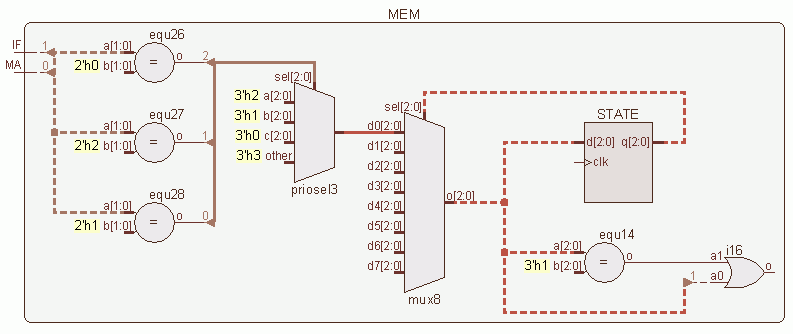
This incrementally generated schematic diagram shows only a part of the whole circuit: the dashed wires indicate nets or buses that connect more than what is currently displayed. In addition, this example uses a Nlview feature that displays constant values as labels at the pins (here with yellow background) rather than routing power/ground nets to those pins. This example comes from elaborated Verilog, actually from the OpenCores project Aquarius.
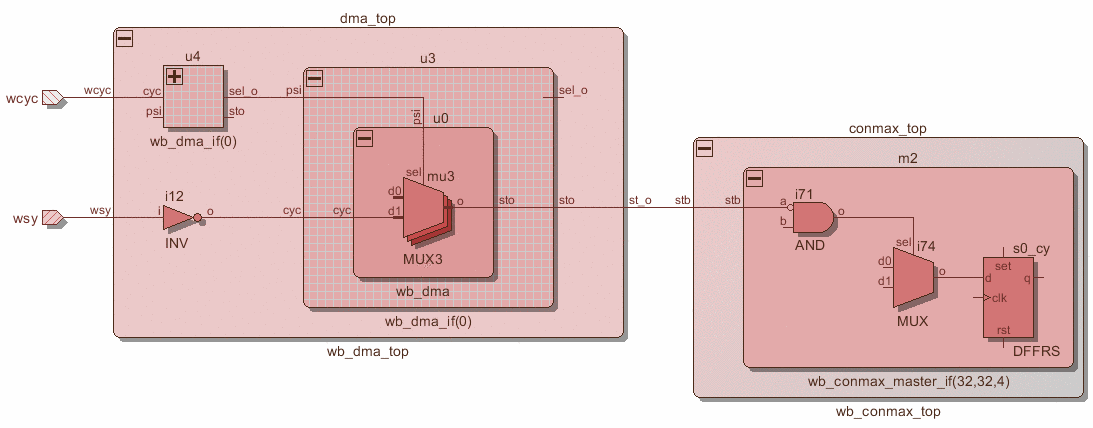
This schematic diagram shows two signal paths thru a hierarchical circuit. The different hierarchy blocks are colored differently illustrating some rendering features that Nlview provides, including drop shadow and a sandwich-style stacked appearance. The plus and minus buttons can be used to unfold and fold hierarchy blocks. Nlview can also provide incremental schematic navigation starting with the given diagram. For this example, the loading of the netlist and the generation of the schematic diagram takes about 15ms of CPU time and the Nlview data-base consumes about 80kB.
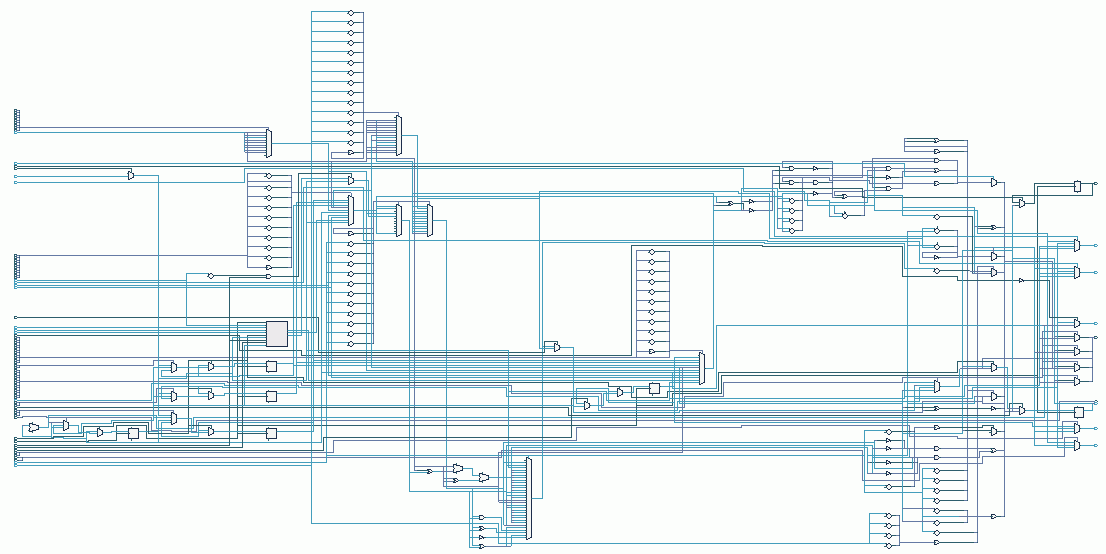
This schematic diagram is the data-path of the Aquarius OpenCores CPU. This example needs about 55ms for loading the netlist thru Nlview's API and about 220ms for the generation of the schematic diagram (on an old Intel Xeon). The Nlview data-base consumes about 2000kB.
Optional Engines
| T-engine | Optional transistor-level schematic generation engine. Press Release. |
| S-engine | Optional system-level schematic generation engine. Press Release. |
| E-engine | Optional schematic generation engine for automotive and aerospace applications. Press Release. |
A Family of Nlview Widgets
Nlview interfaces with many different GUI development environments. Each GUI environment requires a different member of the Nlview Widget Family like e.g. NlviewQT for the Qt development environment. Each "family member" is available as a separate product in a separate distribution package. However, they all share exactly the same algorithms and identical APIs and only differ in the way they are tailored for a certain GUI system. Each Nlview product is a software component (available as linkable binary and header files) that is intended to be used as a GUI building block for the customer's application.
For a detailed list of supported hardware platforms, see our Platform Support page.
The Nlview Family consists of:
NlviewQT
NlviewQT is a component for the Qt cross-platform application and user interface framework (owned by The Qt Company, former by Digia Plc, Nokia and Trolltech). It is implemented as a class derived from QWidget and provides a qmake- and cmake-based build flow. It is available on most UNIX and Microsoft Windows platforms.
NlviewTK
NlviewTK is a Tcl/Tk component available as a loadable object on most UNIX and Microsoft Windows platforms. It is implemented as a standard Tcl extension for Tcl/Tk 8.2 or later.
NlviewJA
NlviewJA is a component for the Java platform and is available as a Swing-based component or alternatively as an AWT-based component. It is implemented as a class derived from JComponent and Component, respectively. NlviewJA is bundled as a Java Bean and supports JDK 1.6 or later.
NlviewJS
NlviewJS is a JavaScript package that runs in modern web browsers.
It can be added to HTML pages for server/client based web applications (e.g. using AJAX).
NlviewJS uses HTML5 canvas objects for rendering.
It is bundled as a .js file and comes with some usage examples.
Nlview is also available as a WebAssembly component.
NlviewMFC
NlviewMFC is a Microsoft Windows "control" based on the Microsoft Foundation Class Library (MFC). NlviewMFC is a MFC extension DLL and is implemented as a class derived from CWnd. It supports MFC version 4.2 or later.
NlviewWIN
NlviewWIN is a Microsoft "window" using the Microsoft native Win32 interface (internally based on the Microsoft Foundation Class Library). NlviewWIN is available as a DLL.
NlviewWX
NlviewWX is a component for the wxWidgets cross-platform GUI library. It supports wxWidgets on GTK version 2.4.2 or later.
NlviewPTK
NlviewPTK is a Perl package using the Tk module; Perl is available on most UNIX platforms and on Microsoft Windows.
NlviewCORE
NlviewCORE is a GUI-less component for building headless programs that may e.g. output graphic files like SVG, PostScript or PDF in batch mode.
| Nlview | TK | JA | JS | MFC | QT | WX | PTK |
|---|---|---|---|---|---|---|---|
| GUI | Tcl/Tk ≥ 8.2 | Java ≥ 1.6 | HTML Canvas | MFC ≥ 4.2 | Qt ≥ 4 | wx ≥ 2.4.2 | Perl/Tk |
| Available as | Tk Widget | Java Class | Library | C++ Class | C++ Class | C++ Class | Tk Widget |
| Deliverable | binary | binary | JavaScript | coreLib & sources | |||
| API | commands with string arguments | ||||||
| callback | listener | callback | event | signals / slots | callback | callback | |
| Configuration | Tk options | Bean properties | Class properties | Qt properties | Tk options | ||
| Export | PDF, PS, EPS, SVG, HTML5 CANVAS | ||||||
| Printing | Tk image | native (Graphics2D) | native (Browser) | native (CDC) | native (QPainter) | native (wxDC) | Tk image |
| Custom Images | OK | OK (Browser) | OK | OK | OK | ||
Good Reasons for Choosing Nlview
The Nlview schematic engines give software teams unparalleled reliability, flexibility and performance, so that they can realize GUIs for EDA applications with shorter design cycles, lower development and maintenance cost and with higher quality.
Build or Buy?
Automatic schematic generation and display capabilities are typically integrated into EDA applications such as logic synthesis, simulation, verification, emulation, test automation and physical design. Developing high quality and high performance schematic diagram generation and viewing technology for one of these applications is tedious and time-consuming. The EDA tool developers' leverage comes from focusing on their core competency, not from spending their precious resources developing schematic technology. Concept Engineering is totally focused on schematic generation and viewing technology The resources required by commercial and in-house CAD tool developers to create schematic technology of equal speed, quality, and capability are sufficiently high so that these companies welcome the opportunity to purchase ready-made schematic technology. With the Nlview Widgets software components, software teams can begin focusing on the important issue of their project – the application.
An Industry Standard
Today the Nlview Widgets family is the most robust and flexible schematic generation and viewing technology on the market. Concept Engineering's component-based solutions ensure that applications work reliably and that integrators get the highest level of control and customizability. With tens of thousands of installed EDA applications making use of Nlview Widgets, Concept Engineering clearly sets the industry standard for schematic generation and viewing.
Integrate Nlview into Customer Application
The production-proven API (Application Programming Interface) provides a simple set of commands, callbacks and configuration properties and makes it easy to exchange data and information with the application. Nlview Widget components are available for the most common GUI development environments and easily fit into most software development flows.
At a Glance
| Features | Benefits |
|---|---|
| Simple and robust API | Ensures easy integration and reliable applications |
| Production-proven software components | Performance and quality of application is very high |
| Highly customizable component | Widget and application fit together |
| Qt, Tcl/Tk, Java, JavaScript, WebAssembly, PyQt, Windows, wxWidgets and Perl/Tk | Easily fits into your existing software development flow |
| Proprietary algorithms | Result in easy-to-read schematics and short response times |
| On-the-fly schematic creation | Results in very high speed and capacity |
| Bi-directional communication between widget and application | Allows interaction with the application (e.g. cross-probing, highlighting, attribute display, ballooning) |
| Incremental schematic viewing | Allows interactive modification of schematic fragments |
| Windows and UNIX platform support | Application will work on almost any hardware platform |
| Built-in RTL and gate-level symbols | Application works without symbol libraries |
| Symbol translation tools | Provide access to existing symbol libraries |